Nikhil Jadhav
Feb 24, 2026 · 8 min read
Dogfooding the Cockpit: Why I Test My Own HMI Designs in My Car
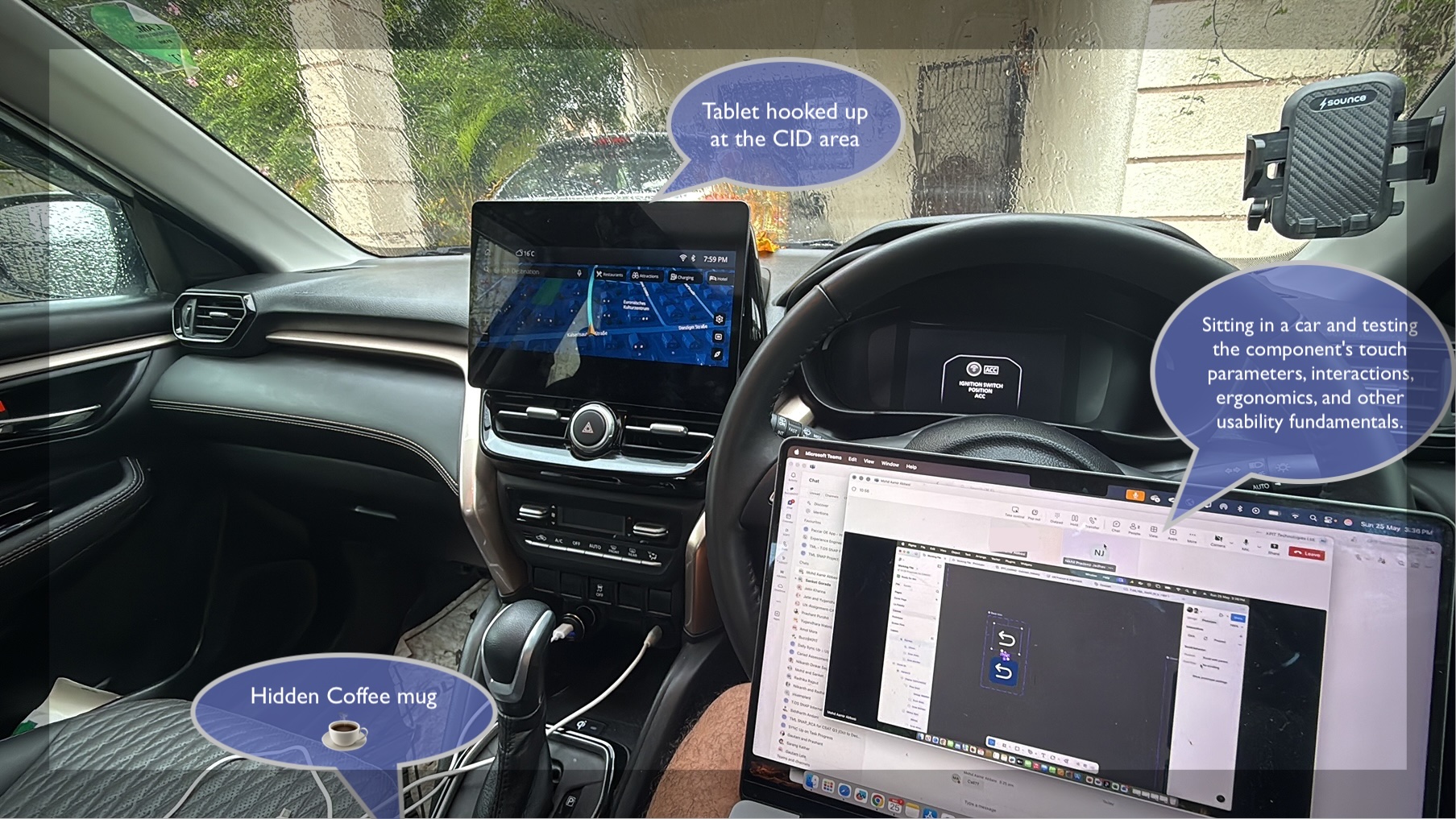
A prototype can look perfect on a Figma canvas and still feel completely wrong behind the wheel.
One of the practices I have found particularly valuable while designing automotive HMIs is surprisingly simple: I test my own designs in my own car. Not on a laptop. Not with a mouse. Not sitting comfortably at a desk.
I take the prototype, load it onto a tablet, place it where the infotainment screen actually sits, and interact with it from the driver's seat. I call this dogfooding the cockpit. And it has changed the way I think about automotive UX.
Why test your own design?
Automotive interfaces have a problem that many digital products don't: the interface exists inside a physical environment. When designing a mobile app, I can sit at my desk and evaluate whether a button is easy to find and tap. Inside a car, the equation changes.
The driver is:
- Sitting at a fixed distance from the display
- Moving through a constantly changing environment
- Dividing attention between the road and the interface
- Potentially dealing with sunlight, glare or reflections
- Interacting without always looking directly at the screen
- Using touch while the vehicle is moving
- Operating controls based partly on muscle memory
A design that feels intuitive on a 27-inch monitor can feel completely different when experienced from the driver's seat. That's why I believe context is part of the interface.
From Prototype to Physical Context
My setup is deliberately simple. I take the HMI prototype and run it on a tablet. Then I position the tablet approximately where the vehicle's actual infotainment display would be.
The goal isn't to pretend that a tablet is the final production system. The goal is to introduce physical context as early as possible.
I can now evaluate things that are difficult to understand from a Figma canvas:
- Can I comfortably reach the control?
- Is the hierarchy obvious when I only glance at the screen?
- Are the touch targets large enough?
- Does the interaction require too much precision?
- Does the next action feel obvious?
And perhaps most importantly: Does this interaction still make sense when I'm sitting in the driver's seat?
This Is More Than Just Testing
There are several UX methodologies that come together in this exercise.
1. Cognitive Walkthrough
I start with a specific task. For example: “Adjust the ambient lighting” or “Change a vehicle setting.” I then walk through the flow step by step.
At each point, I ask:
- Would the driver know what to do next?
- Is the action discoverable?
- Is the system feedback clear?
- Is the sequence logical?
- Does the interaction create unnecessary cognitive load?
I'm effectively becoming the user and walking through the mental model the interface expects.
2. Heuristic Evaluation
The next layer is evaluating the interface against usability principles. But automotive HMI requires more than simply applying traditional interface heuristics.
I specifically look at:
Glanceability — Can I understand the screen hierarchy quickly without reading everything?
Touch Target Size — Can I accurately hit the control without needing pinpoint precision?
Reachability — Where is the control positioned relative to the driver's natural reach?
Feedback — Does the interface clearly communicate that my action was successful?
Consistency — Would this interaction behave the way I expect based on other parts of the vehicle?
3. Dogfooding — Eating My Own Dog Food
This is the part I particularly enjoy. Dogfooding is essentially using what you have created yourself. In product development, that often means employees using their own product before customers do.
For automotive UX, I see an additional opportunity. Instead of asking, “Does this design look good?” I ask, “Can I actually live with this interaction?”
I use the prototype myself. I touch it. I repeat the task. I make mistakes. I try it from different positions. And sometimes I discover something that wasn't obvious during design.
A button that looked perfectly positioned suddenly feels too far away. A hierarchy that looked obvious on the design canvas suddenly takes longer to interpret. A touch interaction that felt effortless with a mouse becomes unnecessarily precise with a finger.
That's the value of dogfooding. You stop designing for the screen and start designing for the situation.
4. Tablet Simulation — Bringing the Interface Into the Car
The physical setup is just as important as the interaction. Mounting the tablet approximately where the infotainment screen sits creates a basic in-vehicle simulation.
It introduces:
- Physical viewing distance
- Reach distance
- Screen angle
- Driver position
- Ambient lighting
- Reflections
- Real-world distractions
- Actual finger interaction
It's obviously not a replacement for a proper usability study or vehicle validation. But it is a powerful early design validation technique. And it costs almost nothing.
The Biggest Learning: Context Changes Design
One of the biggest lessons from doing this is that screens don't exist in isolation.
When I'm designing at my desk, I tend to think in terms of:
Screen → Component → Interaction → Flow
Inside a vehicle, I have to think more like:
Driver → Context → Attention → Reach → Interaction → Feedback
That shift changes design decisions. A control might be visually beautiful but poorly positioned. A screen might contain all the required information but be too dense. A navigation pattern might technically work but require one glance too many.
A touch target might meet a design system specification but still feel uncomfortable in the physical environment. This is where automotive UX becomes fundamentally different from designing a conventional digital product.
The Prototype Is Not the Product
This exercise has also reinforced an important principle for me: A prototype demonstrates an interaction. The physical context reveals whether that interaction actually works.
Figma can tell me whether the flow is logically connected. A prototype can tell me whether the interaction behaves correctly. But placing that prototype inside the car can tell me whether the experience feels appropriate for the environment.
That's a very different level of validation.
What I Look For During a Dogfooding Session
My informal checklist is becoming something like this:
This isn't a substitute for formal research. It's a way to catch obvious problems before formal research.
Why I Think More Designers Should Do This
We often talk about being user-centered. But sometimes the first step is simply becoming more critical of our own work.
Before putting a prototype in front of 10 users, 100 users or an entire vehicle program, I want to know: Have I actually experienced what I'm asking the user to experience?
For automotive UX, that means getting out of the design tool and getting into the car.
Because the best place to test a cockpit isn't always the design studio. Sometimes, it's the cockpit itself.
Final Thought
Dogfooding isn't about proving that my design is right. It's about finding out where it is wrong while there is still time to change it.
And that's perhaps the most valuable form of self-critique a designer can practice.
“Design it. Put it in context. Use it yourself. Break it. Learn from it. Then improve it.”
That's how I like to dogfood the cockpit.